

Booking your bus to your destination using GUO online booking is straightforward to navigate. The GUO online booking allows passengers book their bus from any part of the world with a few steps.
The online portal also facilitates payment of transport fares, eliminating the need to visit a GUO transport terminal to pay for your bus fare.
The process of booking GUO online involves four key steps, which we will outline in this article.
The steps are straightforward and self-explanatory and shouldn’t be a hassle to anybody, regardless of their level of computer literacy.
Step 1: Visit the GUO Transport Main Site
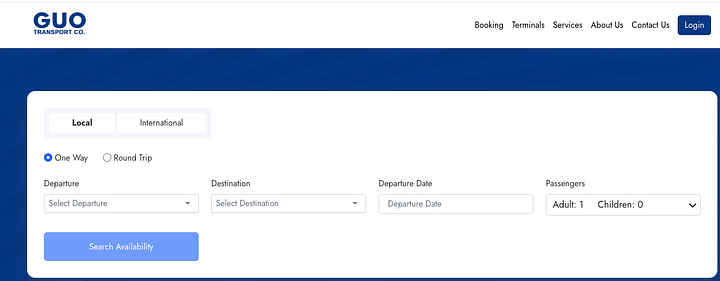
- To start the GUO online booking process. Head over to www.guotransport.com and select booking from the menu.
- The GUO website will display a dashboard showing a local or International trip. Select your choice of trip and proceed.
- The website will present you with four options: Departure, Destination, Departure Date and Number of Passengers.
- Enter details of your travel by filling out the form. When you are done, click search availability.
Step 2: Confirm Availability and Seats
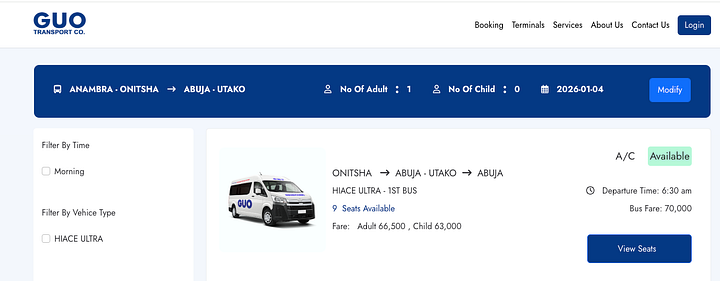
- When you click search availability, the website scans for available buses and presents them to you.
- If a bus is available, it will be displayed alongside the bus type and price.
- Click View Seats to see the available seats and choose your preferred seat.
Step 3: Register or Log In
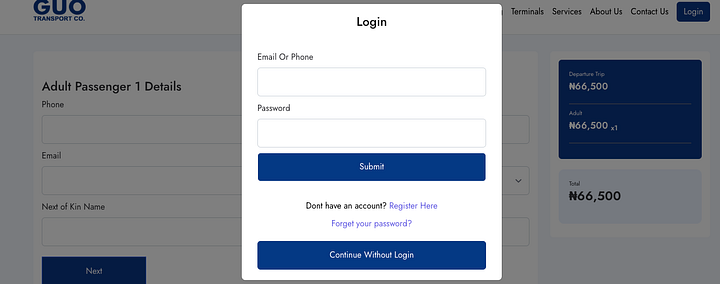
- After selecting your available seat, the GUO website will lead you to the registration portal, where you can either log in if you are an existing customer or register if you are a first-time customer.
- For existing customers, the GUO database brings out your data, so you don’t need to input the.m
- For new customers, enter your data as if it’s for Facebook, then proceed to the checkout page.
Step 4: Pay for your Bus Fare
- Enter your card details and pay for your busfare on the GUO website.
- Transaction details and the receipt will be sent to the email you provided in the above step and to your phone number.
- Take the transaction details and receipt to a GUO terminal on your day of departure for confirmation and printing.
- Present the printed receipt to the GUO boarding officer at your designated vehicle for access to the bus.
Alternative Means for GUO Online Booking
Suppose you don’t want to go through the rigours of booking the bus online yourself. There is an alternative to the process.
- You can call a booking attendant at any GUO terminal to complete the process on their end.
- The attendant gives you the account details to pay for your Transport fare. When the attendant confirms the transfer, she can book a bus for you after getting your phone number.
- Please note that this only works for existing customers who already have their database with the GUO transport company.
- If you don’t have a contact in GUO. You can call Uchechi: Guo Utako at 07032412393
