
Close Menu
    Facebook X (Twitter) Instagram YouTube
    Facebook X (Twitter) Instagram
    Infoeast
    Subscribe
    • Politics
    • Business
    • Academia
    • Tech
      • Consumer Tech
    • Entertainment
      • Sports Watch
      • Music
      • Movie Box
    • Events
    • Spotlight
    • Diaspora
    • Feature
      • Facts
      • People
    • Partner
    Infoeast
    Home » GUO Online Booking: How to Book your Bus in 5 mins 
    Facts

    GUO Online Booking: How to Book your Bus in 5 mins 

    Michael Ndu-okekeBy Michael Ndu-okekeDecember 17, 2025No Comments3 Mins Read
    Facebook Twitter Pinterest LinkedIn Tumblr Email
    GUO online booking
    Image Credit : GUO
    Share
    Facebook Twitter LinkedIn Pinterest Email

    Booking your bus to your destination using GUO online booking is straightforward to navigate. The GUO online booking allows passengers book their bus from any part of the world with a few steps. 

    The online portal also facilitates payment of transport fares, eliminating the need to visit a GUO transport terminal to pay for your bus fare. 

    The process of booking GUO online involves four key steps, which we will outline in this article. 

    The steps are straightforward and self-explanatory and shouldn’t be a hassle to anybody, regardless of their level of computer literacy. 

    Step 1: Visit the GUO Transport Main Site
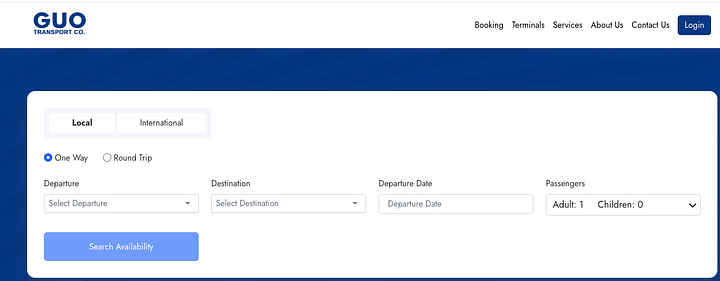
    • To start the GUO online booking process. Head over to www.guotransport.com and select booking from the menu. 
    • The GUO website will display a dashboard showing a local or International trip. Select your choice of trip and proceed.
    • The website will present you with four options: Departure, Destination, Departure Date and Number of Passengers. 
    • Enter details of your travel by filling out the form. When you are done, click search availability. 

    Step 2: Confirm Availability and Seats 
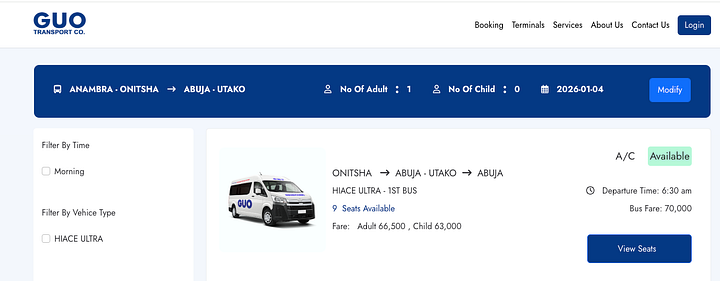
    • When you click search availability, the website scans for available buses and presents them to you. 
    • If a bus is available, it will be displayed alongside the bus type and price. 
    • Click View Seats to see the available seats and choose your preferred seat. 

    Step 3: Register or Log In 
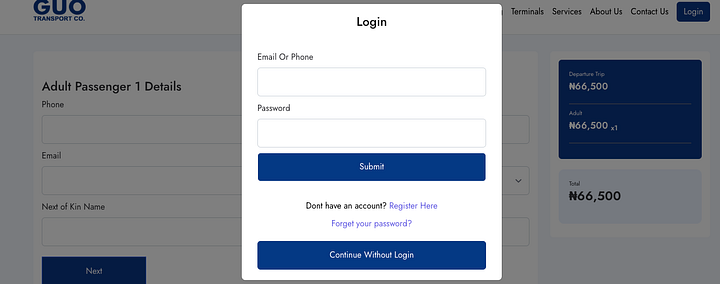
    • After selecting your available seat, the GUO website will lead you to the registration portal, where you can either log in if you are an existing customer or register if you are a first-time customer. 
    • For existing customers, the GUO database brings out your data, so you don’t need to input the.m
    • For new customers, enter your data as if it’s for Facebook, then proceed to the checkout page. 

    Step 4: Pay for your Bus Fare 

    • Enter your card details and pay for your busfare on the GUO website. 
    • Transaction details and the receipt will be sent to the email you provided in the above step and to your phone number. 
    • Take the transaction details and receipt to a GUO terminal on your day of departure for confirmation and printing. 
    • Present the printed receipt to the GUO boarding officer at your designated vehicle for access to the bus. 

    Alternative Means for GUO Online Booking 

    Suppose you don’t want to go through the rigours of booking the bus online yourself. There is an alternative to the process. 

    • You can call a booking attendant at any GUO terminal to complete the process on their end. 
    • The attendant gives you the account details to pay for your Transport fare. When the attendant confirms the transfer, she can book a bus for you after getting your phone number. 
    • Please note that this only works for existing customers who already have their database with the GUO transport company. 
    • If you don’t have a contact in GUO. You can call Uchechi: Guo Utako at 07032412393
    GUO online booking
    Share. Facebook Twitter Pinterest LinkedIn Tumblr Email
    Michael Ndu-okeke
    • Website
    • X (Twitter)
    • LinkedIn

    Michael is a seasoned journalist and editor passionate about reporting accurate journalism bits. His work has featured on Nairametrics, Peoples Gazette, and Techpoint Africa. He is the founder of Infoeast and drives the vision to cover the Southeast region of Nigeria in depth.

    Add A Comment
    Leave A Reply Cancel Reply

    • Features

    Analysis : X-raying Omoyele Sowore’s Strange Protest in Abia State

    March 13, 2026

    Enugu’s New Haier Factory is a Replica of China’s Shenzhen Model

    February 17, 2026

    SEV2050 : The Urgent Need to Move from Ideas to Implementation

    February 6, 2026

    How Ebonyi’s Overseas Scholarship Program Can fix its HDI

    February 4, 2026

    Anambra’s Information Chief Release Security Emergency Numbers

    February 2, 2026

    Where is Our Data : Afia Tv Hosts Debate on Data Gaps in Eastern Nigeria

    February 1, 2026

    Analysis : Inside Nigeria’s N6.69 trillion Bet on Security in 2026

    January 25, 2026

    How Abia is Pushing to Add Agriculture to its Mainstay under Otti

    January 23, 2026
    RSS Globe Watch
    • Iran War Live Updates: Israel Launches New Strikes on Iran
    • Israel Says Michigan Synagogue Attacker’s Brother Was a Hezbollah Commander
    • Here is the latest.
    • Some Olympic Leaders Want to See Fixed Winter Games Host Cities
    • Two Arrested in Death of Anti-Iranian Regime Activist in Canada
    • In Scolding the New U.S. Ambassador, South Africa Signals Defiance
    About Us

    Infoeast is the leading new media publication in Eastern Nigeria. We Operate from our five bureaus in Onitsha, Owerri, Aba, Enugu and Abakaliki
    Stay informed and ahead of the curve with our fact-checked Journalism.

    Facebook X (Twitter) Instagram
    Categories
    • Academia (81)
    • Business (316)
    • Consumer Tech (5)
    • Diaspora (8)
    • Events (106)
    • Facts (12)
    • Feature (25)
    • Movie Box (1)
    • Music (6)
    • Partner (12)
    • People (22)
    • Politics (222)
    • Sports Watch (1)
    • Spotlight (2)
    • Tech (68)
    Facebook X (Twitter) Instagram YouTube LinkedIn
    • About Us
    • Advertise
    • Editorial Policies
    • Contact Us
    • Privacy Policy
    • Terms and Condition

    Type above and press Enter to search. Press Esc to cancel.